Friday, 13 June 2014

Thursday, 12 June 2014
Technology Classes at Tamaki College!
Every Thursdays classes 4, 2 and half of 1 walks down to Tamaki College for tech (Technology). There are 3 different groups and they are Food, Hard Materials and Graphics. Year 7’s were in Hard Material, Half of the Year 8’s were in Food and in Graphics were Year 7 and 8’s.
Pewter is a type of metal that can be melted and turned into something nice that you will like. It can also can be used for things like necklaces and jewelry that you can wear. There are different types of pewter. For example Brass, Iron, Lead, Copper, Gold, Silver, Nickel, Diamond, Palladium and many many more.
First, we had to find a silhouette for us to copy so we can trace onto the MDF and cut out. When we have done that we Mr Grundy poured the pewter into our molds that we created. It had to be cooled down before we do anything else.
After that we had to file all the corners and edges with a needle file. It had to be nice and smooth. Not sharp. When that was done had to sandpaper our piece that we were doing. The grits that we used were 150, 400, 800, 1200 and 1200 with water. We had make sure that it is a nice finish.
Being in Hard Materials was fun and entertaining at times. It was fun just getting to learn new things and just being able to see new things.
Friday, 6 June 2014
What is a Smart Footprint?
A Smart Footprint, what is it? A Smart Footprint is something that is on the internet. Not like when you jump in the sand or step in something, I’m not talking about that Footprint.
When you go onto a site or just accidentally click on something wrong that is a Wrong Footprint. If you send or forward someone an email that is not work related, that would be a Dumb Footprint. If you see something that is Dumb and you just delete it, that is a Smart Footprint.
 To leave a Smart Footprint you have to do the right thing, not be dumb, stay safe online and many more. When you finish all of your work and making sure that it is all done. That is a Smart Footprint. If you do anything good and your teacher/principal will be impressed, that is a Smart Footprint.
If you are not on bad sites that teacher will be seeing you working and doing the right thing. But, if you are doing something bad on the internet you are not invisible that teacher will see you doing that also. So say to yourself “I will not go on bad sites”. Why be BAD when you can be responsible
Whenever you are on the internet make sure that you are doing the right thing. Make sure that you always finish off work properly. Don’t just say you're done when you have just written 2-3 paragraphs in writing. Be Cybersmart and keep doing the right thing.
Wednesday, 4 June 2014
My Sound Animation!
This here is my Sound Animation. I have been using Imovie to edit and create but I have also been using Hyperstudio to draw and create as well. I hope you Enjoy! it can be funny at times so have a laugh while you are watching! (The Brain that I have drawn) might look funny to you.
Sound In Space!
Sounds in Space
List 3 interesting facts that you learned from the article:
1. In space there is no air, so if you say anything no one will hear you.
2. Sounds are caused when something vibrates.
3. Vibrations can travel through solids things as well as air.
Why can’t we hear sound in space?
Because space is a place of silence and there is also no air and also nothing for the vibration to travel through.
Read this Article: The Sounds of Interstellar Space
How did NASA record the sounds of interstellar space?
The data was stored on an old fashioned tape recorder!
What does deep space sound like?
it’s like Dawn Chorus of birds singing in spring from super bass!
What does the plasma wave detector detect? How do they turn this into sound?
It senses waves of electrons. Play the data through a loudspeaker and listen.
How to play net-ball!
How to play net-ball!
Do you know how to play net-ball? Well, if you don’t here is an explanation on how to. First, there are 7 positions that any of your teammates can play. For example Goal Shoot, Goal Attack, Goalkeeper, Wing Attack, Wing Defence and Centre.
To play have to know the basics. Passing, Not Stepping and . As you can see down below is what the court looks and where the positions go just before the whistle. In net-ball there is a round ball that is used. There are 2 goal posts that the goal shoot and goal attack can shoot in. As you can see also in the picture that there are lines and 2 circles at the end of each end of the court. The lines are bound trees which of the positions cannot pass.
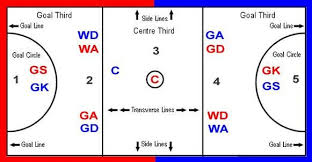
If you are not three feet from the person you are defending the ref will call obscuration. If you accidentally hit a person with the ball that is called contact. If you cross the line on the court when you are not supposed to that is called Braking, which is not a good thing. The ref will also blow the whistle and your team or the other team will get the ball. It depends who’s centre pass it is.
When you are Goal Shoot, your team is counting on you to get most of the goals in. Goal Attack is when you are also a shooter but you are just a back up for the Goal Shoot. GoalKeeper has to stop the Goal Shooter from shooting the ball into the goal. He or she and also around the court but within the circle and past the line.
Wing Attack is when you are a wing and the centre will pass it to you if there is no one else free. Wing Defence is like Wing Attack but different. You have to defend wing attack from the other team that you are versing. And the last position and the last one is Centre. You have to run around the court and be able to be there to get the ball.
Tuesday, 3 June 2014
How to post a piece of writing onto your blog.
How to post a piece of writing on your blog.
Do you know how to post a piece of writing onto your blog? Here is an explanation on how.
First, you have to have a blog and an account so you can log in and start posting things onto it. Then, you should be able to access and do anything or post anything on your blog. But, the main thing is you have to make sure that your writing is all done and ready to be posted.
Next, you are just going to post your writing on your blog, if you want to be ahead have the blogger link (blogger.com) already open as well as the doc with your writing.
When, you click onto the blogger tab, click on the little sign that looks like a pencil. Then when that opens, write in a title in the little rectangle on the top of the screen next to the word Post. After that click back on your doc with your writing and select it all (Ctrl A) and then copy and paste ( Ctrl C - Ctrl P) it in the big rectangle shape on the blogger TAB.
After, you have done that your writing should be ready to post. But, first write some labels. To do that in the top right corner there should be a little rectangle shape with a word ‘Labels’ in it. Click on it and put things for example ,your name, the word ‘google’, what year it is, what term it is, what writing is about etc. When you have done that click post and then it should appear on your blog and will be saved.
Subscribe to:
Posts (Atom)